
ABOUT THE LEARNING COMMONS
The Mission of the Learning Commons is to strengthen comprehensive learning, enhance retention and promote student success by providing students with academic support services through tutoring, supplemental instruction, skill development, and facilitation of peer-to-peer collaborations.
What is the “Learning Commons”?
The Learning Commons is here to help you succeed in your classes and establish lifelong learning habits. We do this by providing FREE academic support through peer and professional tutoring in many subjects, and in general study skills as well. We are striving to create an inviting learning environment that is symbolic of BCC’s vision to invest in each student’s success.
Contact Us
Email: LearningCommons@bcc.cuny.edu
Monday – Friday: 9:00 am – 6:00 pm
ON-CAMPUS (In-Person) TUTORING
Mathematics Tutorial Laboratory
Fall 2026 Schedule
September 3, 2026 – December 21, 2026
In Person + Online Schedule
Monday – Thursday || 11 am – 8 pm
Friday and Saturday || 12 pm – 6 pm
Location: CPH 303, 3rd Floor
Closed on holidays
In-Person appointments are highly recommended. Walk-ins are welcomed. The link to schedule in-person appointments is posted in Brightspace on the BCC Tutoring Tab
Writing Center Tutoring
Fall 2026 Schedule
September 3, 2026 – December 21, 2026
In-Person Schedule
Monday and Wednesday || 10 am – 6 pm
Tuesday || 10 am – 8 pm
Thursday || 10 am – 7 pm
Friday and Saturday || 12 pm – 4 pm
Online Schedule
Monday and Tuesday || 10 am – 8 pm
Wednesday || 10 am – 6 pm
Thursday || 10 am – 7 pm
Friday and Saturday || 12 pm – 4 pm
Location: Sage Hall, Room 100
The link to schedule in-person appointments is posted in Brightspace on the BCC Tutoring Tab
Specialized Tutoring
Click Below to View schedules
Schedule an Appointment via Brightspace’s “BCC Tutoring” Tab
Fall 2026 Schedule
February 4, 2026 – May 26, 2026
ACC 111 & 112 Only
Tuesday || 1 pm – 5 pm
Thursday || 12 pm – 5 pm
Location: CPH 303
The link to schedule in-person appointments is posted in Brightspace on the BCC Tutoring Tab
Fall 2026 In Person Schedule
August 31, 2026 – December 21, 2026
In-Person Schedule
Monday – Friday || 11 am – 7 pm
Location ME 418
___________________________________
Online Schedule
Mon – Wed || 6 pm – 9 pm
Saturday || 12 pm – 9 pm
The link to schedule in-person appointments is posted in Brightspace on the BCC Tutoring Tab
Sign in to your CUNY zoom account before joining
Claim your free CUNY zoom account at Cuny.zoom.us
Sign in with your CUNYFirst credentials
Spring 2026 In Person Schedule
February 4, 2025 – May 26, 2026
Mon & Tue || 12 pm – 7 pm
Wednesday || 11 am – 5 pm
Thursday || 12 pm – 8 pm
Friday || 12 pm – 6 pm
Location ME 816
*No appointment needed. Just walk in*
The link to schedule in-person appointments is posted in Brightspace on the BCC Tutoring Tab
___________________________________
Fall 2026 Online Schedule
Saturday || 11 am – 5 pm
*By appointment only*
Schedule via Online Tutoring Tab on Brightspace.
A zoom link will be sent with your appointment confirmation
Sign in to your CUNY zoom account before joining
*Claim your free CUNY zoom account at Cuny.zoom.us*
Sign in with your CUNYFirst credentials
Fall 2026 Schedule
TBA
Location: Zoom
Links to Online session are sent with appointment confirmations
The link to schedule in-person appointments is posted in Brightspace on the BCC Tutoring Tab
Fall 2026 Schedule
September 3, 2026 – December 21, 2026
In-Person Schedule
Mon – Thu || 11 am – 3 pm
Location: CPH 303
Appointments are encouraged, walk ins are accepted. The link to schedule in-person appointments is posted in Brightspace on the BCC Tutoring Tab.
DAT and BIS can be found in the Math Lab Fall 2026 (In-Person) Schedule
Spring 2026 Schedule In-Person & Online
Location: Colston Hall 345
Tue & Thu || 10 am – 4 pm
Friday || 9am – 1 pm (Online Only)
Visit Colston Hall 345 for Online access or Email: mara.lazda@bcc.cuny.edu
Fall 2026 Schedule
September 3, 2026 – December 21, 2026
Mon, Tue, Thu || 10 am – 4pm
Location: Meister Hall 5th floor
Schedule || MLT Study Lab
The link to schedule in-person appointments is posted in Brightspace on the BCC Tutoring Tab
Fall 2026 Schedule
September 10, 2026 – December 21, 2026
Online Schedule
Friday || 6 pm – 8 pm
Sat & Sun || 10 am – 2pm
Location: Online
Fall 2026 Schedule
August 31st – December 21st
In-Person
Location: CPH 303
Mon & Wed || 11 AM – 3 PM
Tue || 11 AM – 1 PM, 3 PM – 5 PM
Thu & Sat || 12 PM – 5 PM
Walk ins are welcome
Appointments are Prioritized
Online
Location: Online Math Lab Tutoring Suite
Thu & Fri || 4 pm – 7 pm
Sunday || 12 pm – 3 pm
Walk ins are welcome
Appointments are Prioritized
Fall 2026 Schedule
September 3rd – December 21st
In-Person
Mon & Tue || 11 am – 6 pm
Wed || 11 am – 3 pm, 5pm – 8pm
Thursday || 11 am – 3 pm
Friday || 12 pm – 6 pm
Location: CPH 303
Online
Mon & Thu || 11 am – 5 pm
Tue & Wed || 11 am – 6 pm
Friday || 2 pm – 6 pm
Saturday || 12 pm – 6 pm
The link to schedule in-person appointments is posted in Brightspace on the BCC Tutoring Tab
Physics is located in the “Math Lab Spring 2026” Schedule on Mywconline
Fall 2026 Schedule
September 10 – December 21
In-Person Schedule
Wednesday || 3 pm – 7 pm
Location: NL 133
Online Schedule
Mon, Tue, Thu || 4 pm – 7 pm
Location: Zoom
The link to schedule an appointment is posted on Brightspace’s “BCC Tutoring” Tab
ONLINE TUTORING
Summer 2026 Schedule
June 1, 2026 – June 24, 2026
June 29, 2026 – July 30, 2026
Monday – Thursday || 12 pm – 6 pm
Sunday || 12 pm – 6 pm
Online appointments are highly recommended. Walk-ins are welcomed. The link to schedule online appointments is posted in Brightspace on the BCC Tutoring Tab
To access online sessions, please refer to the virtual link in the appointment confirmation email.
Closed on Holidays, Fridays and Saturdays, and August 2026

Summer 2026 Schedule
June 3, 2026 – June 25, 2026
Monday – Thursday || 12 pm – 6 pm
June 29, 2026 – August 6, 2026
Monday & Tuesday || 11 am – 6 pm
Wednesday & Thursday || 11 am – 7 pm
The link to schedule online appointments is posted in Brightspace on the BCC Tutoring Tab
Closed on Holidays, Fridays, Saturdays, and Sundays
See Specialized Tutoring Schedule Above!
24/7 Online Tutoring
How To Access Tutor.com through Brightspace.
1. Log into Brightspace and go your course page.
2. In the course menu, banner, or sidebar, click on More.
3. Click on Tutor.com. You will be connected automatically (If you are not connected automatically, please contact the Learning Commons).
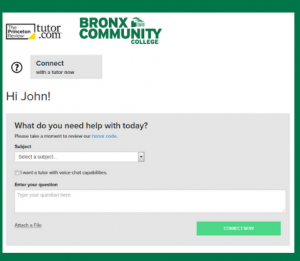
4. Click Connect Now, then fill in the details that best match your course.
5. Click Submit and a tutor will be on their way to join you online.
Below is a list of BCC courses covered by Tutor.com.
| BCC Course | Tutor.com Offering |
|---|---|
| ACC111 | Accounting Intro |
| ART11 | Art History & Appreciation |
| BIO11 | Biology I |
| BIO12 | Biology II |
| BIO23 | Anatomy and Physiology |
| BIO24 | Anatomy and Physiology |
| BIO28 | Microbiology |
| BUS51 | Principles of Management |
| CHM17 | Chemistry 1 & 2 |
| CHM2 | Chemistry 1 |
| COMM11 | Writing or English |
| COMM12 | Business and Organizational Communication |
| COMM20 | Public Speaking |
| COMM22 | Interpersonal and Small Group Communication |
| COMM26 | Journalism |
| COMM34 | Intercultural and Global Communication |
| CRJ11 | Criminal Justice Intro |
| CSI30 | Intro Computer Science |
| ECO11 | Microeconomics, Intro |
| ECO12 | Macroeconomic, Intro |
| EDU10 | Writing or English |
| ENG110 | Composition I |
| ENG111 | Composition I |
| ENG112 | Composition II |
| ENV11 | Physical Science |
| ESE111 | Earth Science |
| FRN111 | French |
| HIS10 | World History |
| HIS20 | US/American History or Civic and Government |
| MEST60 | Mass Communication |
| MTH23 | Statistics |
| MTH30 | Pre-Calculus |
| MTH31 | Calculus I & Geometry |
| MTH5 | Pre-Algebra, Pre-Algebra in Spanish, College Algebra |
| PHM10 | Pharmacology |
| PHY11 | Physics, Algebra-based |
| POL11 | Civics and Government |
| PSY11 | Psychology, Intro |
| SOC11 | Sociology, Intro |
| SPN111 | Spanish |
Tutor.com setup instructions for faculty
- Go to your Blackboard course
- Click the plus (+) sign in the upper-left of the left-hand course navigation pane, then choose “Tool Link.”
- Type “Tutor.com – BCC” in the Name field, then choose the Tutor.com BCC tool from the dropdown list.
- Check the “Available to Users” checkbox, then click “Submit.”
- The “Tutor.com” tool link for your course is now displayed in the left-hand course navigation bar.
If you have any questions or concerns, please contact the Learning Commons.
Phone: 929-314-3731.
Email: LearningCommons@bcc.cuny.edu
Hours: Monday-Friday: 9:00 a.m. – 6:00 p.m
VIRTUAL LEARNING COMMONS
ACADEMIC WORKSHOPS & NEWS
Previous Workshops
1. ACC 111 Fall 2020 Exam Review #1:
-
-
- Recording available via BCC Blackboard Tutoring tab
- Questions ONLY(.pdf)
- Notes & Solutions(.pdf)
-
2. ACC 111 Fall 2020 Exam Review #2:
-
-
-
- Recording available via BCC Blackboard Tutoring tab
- Workshop Notes(.pdf)
- Exam Review Solutions(.pdf)
-
-
3. ACC 111 Fall 2020 Exam Review #3:
-
-
-
- Recording available via BCC Blackboard Tutoring tab
- Workshop Notes – Exam 3(.pdf)
- Exam 3 Review Solutions(.pdf)
-
-